
Program completion
The completion of your program is accomplished when you successfully satisfy the assessment requirements of that program.
Depending on the UTS College program that you are completing, you may move to the next program, or complete your studies with the College and/or articulate to your chosen degree at UTS.
Here’s what you can expect on completing your program, and how we can help you either prepare for your next UTS College program or your articulation to UTS:
- Completing English Programs
- Completing UTS Foundation Studies
- Completing Diploma Programs
- Completing Graduate Certificates
You’ll find more about moving from one program to another at UTS College, on the re-enrolment page.
Academic Records: Testamurs, Certificates and Transcripts
After Completing Your Program
Once you’ve successfully completed your program, you’ll receive your Academic Record after your results have been officially released.
UTS College Program Awards
Diploma and Graduate Certificate Programs
- If you’re studying a Diploma or Graduate Certificate at UTS College, you’ll be awarded both a Testamur and a Transcript.
- The Testamur is your official qualification certificate and includes your name, date, and program title (e.g. Diploma of Business).
- The Transcript lists all subjects completed and the grades achieved.
UTS Foundation Studies
- If you’re studying UTS Foundation Studies, you’ll receive a copy of your Certificate once you have successfully completed the program and your results have been released.
- The certificate includes your name, date, and program title.
- Your Transcript lists all subjects completed and the grades achieved.
English Language Programs
- If you’re studying an English Language program, you’ll receive a Certificate of Satisfactory Completion once you’ve successfully completed your studies and/or at the English Language Program Completion Celebration.
- Your Transcript will list the grades you achieved.
Digital Credentials via My eQuals
All credentials are issued in digital format through My eQuals, a secure online platform used by universities and colleges across Australia and New Zealand to issue, store, and share official academic documents such as transcripts and testamurs.
Availability:
- Diploma and UTS Foundation Studies (Sydney campus): Two weeks after the official results release date each semester.
- English Language Programs (Sydney and international campuses): One week after the results release (Friday).
- Transnational Education Partners: Two weeks after the official results release date each semester.
How to access your academic statements via My eQuals
First-time user?
- You will receive an email from My eQuals when a new credential is issued
- Click the link in the email from your education provider, which will direct you to the registration page if you do not have an account on My eQuals.
- Enter your personal email, create a password, and agree to the terms.
- After submitting your details, you will receive a verification code via email that you must enter to complete your account setup and log in for the first time.
Returning user?
- If you have signed in previously and linked your account to your preferred social sign in or personal email address, you can sign in using these on https://www.myequals.net/user/login
How to share your credentials via My eQuals
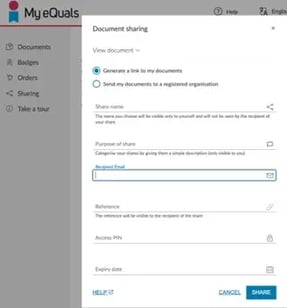
-
- Log in to your My eQuals account.
- Go to the Documents section.
- Select the credential you want to share and click Share.
- You can then choose to share it via email, a direct link, or directly with a verified organisation.
Frequently asked questions
Notifications will only be sent to the primary email address set up in My eQuals.
You can use the same password for all email addresses verified with My eQuals.
If you need your credentialre-issued, please contact the Student Centre.
You can also share your credentials with a registered organisation who may be setup on the platform.
This feature is only available once you have registered for My eQuals.